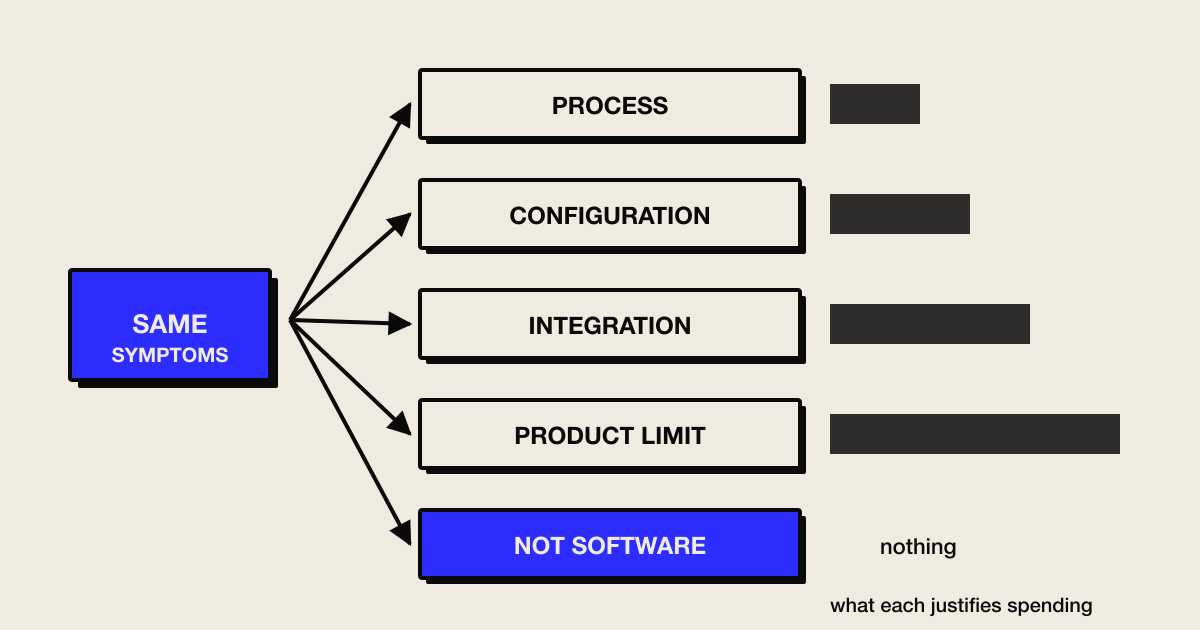
The signs you have read are accurate. They also cannot tell you what to do.
Five different problems produce almost identical symptoms - your process, the way the software is set up, the joins between systems, the product’s own limits, or something that is not a software problem at all. Recognising six signs does not mean the problem is six times worse. It usually means you have not yet separated the cause from the symptom, and the intervention that follows depends entirely on which cause you have.
What is already published, and where it stops
Two things about this territory are worth stating before anything else.
The first is that the genre convention here is the numbered sign list. Across the results we read on 24 August 2026 - roughly forty - the overwhelming majority are some variant of “five signs”, “seven signs”, “ten signs you have outgrown your software”, published by IT consultancies, ERP vendors, accounting-software vendors and development firms alike. They are not wrong. The signs they list are real. But a list of symptoms is not a diagnosis, and reading three of them in a row produces the sensation of a diagnosis without the substance of one.
The second is that at least one guide does considerably better, and it deserves credit rather than being lumped in. An enterprise modernisation guide we opened classifies three distinct interventions - refactor where the architecture is sound but debt has accumulated, replatform where the logic works but the infrastructure is outdated, and rebuild where the system is fundamentally incompatible with what is now required. It supplies four questions to choose between them, and it warns explicitly against defaulting to the most expensive one: frustration with the current system, it says, is real but not sufficient, and rebuild projects fail to scope creep.
That is good, and if you have a technical team you should read it.
Here is where it stops being the right tool for this reader. It sorts how to remediate ageing technology. This page sorts why the fit broke. Those are different questions, and the second one comes first. A business can need a rebuild because its process changed, or because it hit a product’s boundary, or because two systems were never joined properly - and the architectural questions will not distinguish those, because they were never meant to. It is also written throughout for organisations with compliance obligations and technical staff, and it says itself that it does not cover the cost-benefit or the timelines a small business faces.
So: the idea of classifying is not ours. The axis is.
The five types
Process mismatch. The software is fine and the way you work has drifted. The same job is done differently by different people, exceptions are handled ad hoc, and the system is blamed for not accommodating a process nobody has settled. This is the most commonly misdiagnosed type, because the frustration is genuine and the software is where it is felt.
Configuration mismatch. The product can do what you need and has not been set up to. Fields that do not match your vocabulary, workflows that follow the vendor’s default rather than your operation, permissions left at the installation defaults. Everyone works around it, and the workarounds are mistaken for evidence that the tool is wrong.
Integration mismatch. Each system is adequate alone and the joins are missing or manual. The symptom is re-typing, reconciliation, and a report that needs a side spreadsheet before anyone trusts it. Nothing is broken; the gaps between things are.
Product boundary. The tool genuinely cannot do it, and no amount of configuration will change that. The field you need does not exist in its data model, the permission structure cannot express your approval chain, or the thing you sell does not fit the shape it assumes. This is the type that actually justifies replacing or building - and it is far rarer than the volume of “time to replace” content suggests.
Not a software problem. The pain is real and its cause is volume, price, staffing, a market that moved, or a business model under strain. Software is where it shows up because software is where the work happens. Buying some converts a manageable problem into a project with a budget and a launch date.
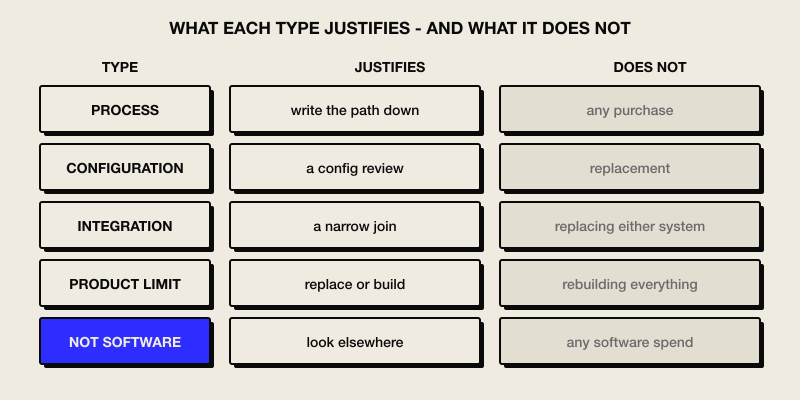
What each type justifies - and what it does not
The final column is the one that matters, and it is the column no sign list carries.
| Type | What it looks like from the inside | What it justifies | What it does not justify |
|---|---|---|---|
| Process | Same job done three ways; exceptions improvised; training by shadowing | Writing the path down and running it for a fortnight inside the current tool | Any purchase. Buying now encodes the inconsistency |
| Configuration | Product could do it; fields and workflows follow the vendor’s defaults; everyone has a workaround | A configuration review - often days, sometimes by the vendor at no cost | Replacement. You would be buying a second product to configure |
| Integration | Re-typing between systems; reconciliation before anyone trusts a number | A narrow join, an import, or a small built layer between two things that stay | Replacing either system. The systems are not the problem |
| Product boundary | The field does not exist; the permission cannot be expressed; the model does not fit | Replacement, or a built system for the part that does not fit | Rebuilding everything. Usually only one part has hit the wall |
| Not software | Volume, price, staffing, market, model | Looking somewhere else entirely | Any software spend at all |
Read the right-hand column first. Four of the five types are cheaper than the intervention people default to, and the fifth costs nothing.
The fifth type deserves its own section
Neither page we opened entertains “this is not a software problem.” That is not dishonesty - one sells modernisation, the other sells replacement, and it is structurally unlikely that either publishes the conclusion that no purchase is warranted.
It is worth saying plainly, because it is a real outcome and we reach it often enough in intake to know it is not rare. If your margins are thin because of what you charge, if jobs are late because there are not enough people, if customers are leaving because a competitor is cheaper - a system will make the work more legible and will not change any of those things. Legibility is worth something. It is not worth what a build costs, and it is a very expensive way to postpone a commercial decision.
The test is a question: if this software were replaced tomorrow with a perfect version, what would actually change about the number that is worrying you? If the honest answer is “not much,” you have found your type.
When the answer is change nothing
Related, and also missing from both opened pages: sometimes the correct action is none.
A system that is unfashionable, unsupported by its original vendor, or built on old technology is not automatically a problem. If it does the work, the people know it, the data comes out when asked, and nothing about it is blocking a decision you need to make - it is doing its job. Ageing is not the same as failing, and one opened guide omits accepting the situation entirely while the other never asks when a legacy system is simply sufficient.
There are conditions under which change nothing stops being available: nobody left who understands it, a supplier who has vanished, data that cannot be got out, or a regulatory requirement it cannot meet. Those are real triggers. Being old is not one.
Telling them apart in an afternoon
You can usually separate these in a single conversation with the person who does the work, using four questions.
“Do two people do this the same way?” If not, you are looking at process before anything else, whatever else is also true.
“Has anyone asked the vendor whether it can do this?” Configuration mismatches survive for years because nobody asks. It is a free question with a fast answer.
“Where does the re-typing happen?” Re-typing is the signature of an integration gap and it is highly visible once you look for it.
“Is there a field or a rule the system simply does not have?” A specific, nameable absence points at a product boundary. A vague sense of not fitting usually does not.
If none of the four produces anything solid, consider the fifth type seriously rather than looking harder for a software answer.
The two types people confuse most
Configuration and product boundary look identical from where the owner sits, and mistaking one for the other is the most expensive error available in this whole diagnosis. One is a few days of somebody’s time; the other is a purchase.
The confusion is structural. In both cases you asked for something, and in both cases you did not get it. What differs is why, and the difference is invisible unless you go looking.
A configuration mismatch usually announces itself in the vocabulary. The product has a concept that is nearly yours but named differently, and the setup followed the vendor’s naming rather than your operation’s. Your “jobs” are its “projects”, your approval step is its “status field”, and nobody mapped one onto the other, so the software describes a business slightly adjacent to the one you run. That mismatch produces constant low-grade friction and looks exactly like the tool being wrong.
A product boundary is narrower and more specific. There is a thing your work requires that the system has no way to represent at all: a second price for the same item depending on customer type, a job that belongs to two people at once, a permission that must apply to some records and not others. You can usually name it in a sentence, and the vendor’s answer, when pressed, is a version of “you would have to work around that.”
The separating question is simply: has anyone asked the vendor whether the product can do this, and got a specific answer? Not the salesperson before purchase - support, now, in writing, about the named thing. It is free, it takes a week at most, and it is the single highest-value question in this diagnosis, because it converts an expensive assumption into a cheap fact.
Ask it before you accept anyone’s recommendation to replace, including ours.
Why several signs at once misleads
This is the mechanism that makes the sign lists actively unhelpful, and it is worth naming.
The signs are mostly downstream of any of the five causes. Frustration, workarounds, reports nobody trusts, staff complaints, slow processes - these show up whether the cause is a drifted process, a lazy configuration, a missing join, or a genuine product limit. So recognising six signs is not evidence of severity. It is evidence that a cause exists, which you already knew.
The trouble is what recognising six signs does to a decision. It feels cumulative, it feels urgent, and urgency plus a list of symptoms reliably pushes people toward the largest available intervention - which is the one most likely to be wrong, most expensive to reverse, and, if the cause was process, the one that bakes the real problem into something new.
One sign you can name precisely is worth more than six you recognise vaguely.
What this classification cannot do
Three limitations.
It does not tell you whether the software is well built. A system can be a perfect fit and poorly made, or an excellent piece of engineering that no longer matches your operation. This page is about fit.
It does not handle several causes at once cleanly. Real situations are frequently a process problem and an integration gap together. The classification still helps - it tells you to settle the process before building the join - but the ordering is a judgement, not an output.
And it is our framing, not an established method. It comes from how we assess an existing system before recommending anything, described as we use it. We have no measured success rate for it and are not going to invent one.
What to do this week
Take the single workflow that generates the most complaints and run the four questions with the person who does it. Write down which of the five types it lands on, and - more usefully - which ones you have now ruled out.
Then look at the right-hand column of the table and check the intervention you were already leaning toward against the type you actually have. If they do not match, you have saved the difference, and that difference is usually the whole reason to spend an afternoon on this.
FAQ
We recognise ourselves in most of the signs - does that mean it is serious? It means a cause exists, which you already knew. The signs are downstream of all five types, so quantity is not severity. One precisely named symptom is worth more than six recognised vaguely.
Can it be more than one type at once? Frequently, and process is usually the one to settle first. A process problem sitting underneath an integration gap will survive the integration work and reappear, so ordering matters more than picking a single label.
Our vendor says we need to upgrade - how do we check? Ask which of the things you want are impossible in the current version rather than merely unconfigured. A specific, nameable absence is a product boundary. A general answer about being on the latest version is a sales conversation.
How do we know it is not just us being disorganised? That is the process type, it is the most common of the five, and it is not a criticism - most operations drift as they grow. It is also the cheapest to fix and the most expensive to ignore, because it is the one that contaminates whatever you buy next.
Notes
- Live result set retrieved 2026-08-24 (en, GB proxy) via requests
req_b471aeb6ac40andreq_892c3c428e70, both at zero budget. Two pages opened and read in full; a third returned HTTP 403 and was not read. Seeresearch/live-result-set.md. - The idea of classifying is not ours. An enterprise modernisation guide we opened sorts interventions into refactor, replatform and rebuild with four decision questions, and warns explicitly against defaulting to a rebuild. It is credited in the second section and recommended to readers with technical staff. What differs is the axis: it sorts how to remediate ageing technology, this page sorts why the fit broke.
- The claim about numbered sign lists is a claim about the form of the results we read on 24 August 2026, not about the quality of any individual page and not a claim that the territory is empty.
- The five types, the what-it-does-not-justify column, the four separating questions and the several-signs-at-once argument are Garaxe’s framing, described as we use them when assessing an existing system. No client outcome, success rate or case result is claimed, and no example here is drawn from named client work.
- No figure is given for how often rebuilds fail. One opened source names scope creep as a common cause; that is its assertion and no rate is attached to it here.
- No AI-assistant answer baseline was collected - the probe was unavailable on 2026-08-24.
- Autocomplete returned no suggestions and no People-Also-Ask questions were returned, so this page makes no claim about what owners search for.
Not sure which kind of mismatch you have?
Describe the workaround that costs the most time - we'll help you name the type and what it justifies.
Talk to Garaxe about the problemRelated Articles
Configure, Integrate, Replace, Build - or Wait
Five paths, not four: configure, integrate, replace, build - or wait. A scored matrix with tie-breakers, including the option every framework leaves out.
small business toolsScoping a First Version: What Decision Will It Produce?
Three of the four parts are standard advice. The fourth - the decision your first version produces - is what stops you building a tidy fragment.
small business toolsWhat Each Blank in Your Software Brief Costs You
The seven-part structure is freely available. What no one prices is each blank - so here is what a missing part does to the number you get back.
Ves Ivanov
Co-founder, Garaxe
Building practical tools for small businesses. Focused on Voice of Customer analysis and actionable marketing insights.